
Legato™ Release Notes
Version 1.0i (GoFiler 4.11a)
01/26/16 10:03 AM ET
| |
Legato™ Release Notes Version 1.0i (GoFiler 4.11a) 01/26/16 10:03 AM ET |
HIGHLIGHT SECTION
Technical Notes
– IDE Improvements
– Script Crunching and Encryption
– Script Engine Parsing Improvements
– Some Function Improvements and New Functions
DETAIL SECTION
1.0 Legato Script Language Notes
1.1 IDE / Programming Environment
1.1.1 Ribbon Changes
– Added a Prepare group to the script ribbon.
1.1.2 Preprocess
A function has been added to preprocess or precompile a script. this is useful to test whether a script will run without actually executing the code. It performs all the processing to ready a script for execution including basic syntax checking, including files and symbol resolution.
The function is available from the ribbon as Script | Prepare | Preprocess.
If errors are found during the preprocess, the function is stopped and the errors reported in the Information View.
1.1.3 Code Crunch
A function has been added to “crunch” code. This IDE function is also available as a script function within the IDE. The function is available from the ribbon as Script | Prepare | Crunch Integrate. The dialog appears as follows:
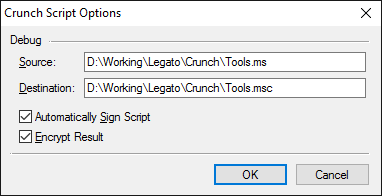
The function removes comments, combines all included information into a single file and optionally signs and encrypts the file. With this change, a new file type has been added, FT_LEGATO_C, which indicates a crunched and encrypted script. Conventionally, .lsc and .msc extensions can be used to indicate a binary version of a script. However, the content of the script is examined by the script engine to determine whether to process it as binary.
The dialog fields are as follows:
Source — The source file. By default it is the currently open and selected file within the IDE. If the currently open file is selected, it should be saved prior running this function.
Destination — The destination filename. It cannot be the active IDE file. It can however be the same name as the source.
Automatically Sign Script — When checked, the script is signed with the default code signing certificate. Note that an incoming signature will be removed.
Encrypt Result — When checked, the content is encrypted to prevent interlopers from viewing the source code.
If errors are found during the preprocess, the function is stopped and the errors reported in the Information View.
1.1.4 Debugging
– Added a Preprocess function that allow a script to be ‘compiled’ and checked for errors. This is particularly useful for checking hooks and other types of scripts that are not of the direct run type. After preprocessing has been completed, a log is presented if errors were found. The preprocess function performs the following major functions:
• Assembles script from included files
• Checks the syntax of the code
• Assembles and resolves all symbols
Preprocessing does not execute any code and will not expose run time errors such as bad or inappropriate values or other programming errors.
– Corrected a problem with break points not always working inside of subroutines.
– Changed the break point marker on the sidebar (the old arrow looked more like the run position).
– Added a test and message box regarding closing an edit window while a debug session is running.
– Added a test and message box regarding closing the application while a debug session is running.
1.2 Parsing and Language
1.2.1 General
– Added error logic to report unknown items in the parse. Certain items, such as a stray backslash, would not be reported as an error and result in undefined behavior.
1.2.2 Directives
– Made an adjustment to the parsing of directives to allow for non-space delineation, for example:
#include "myfile.rc"
is the same as
#include"myfile.rc"
– Corrected an issue where bad pragma names were not being reported as errors.
– Corrected an issue where defines required a space between the defined term its content. For example:
#define A"a"
now works correctly.
– Corrected a problem with #endresource and #include of resource files where the line immediately following the directive was not being interpreted.
1.3 SDK
– Added Windows SDK common dialog control style definitions for many common controls.
1.4 Revised Functions
1.4.1 General:
– SignScript — Error reporting has been added to the SDK and a test is also perform to not allow a script to be signed multiple times.
– SkipToWordSpace and SkipWordSpaces — made the starting index optional.
1.4.2 Dialog
– EditGetText — Added validation options.
1.5 New Functions
Script Control
– ScriptCrunch — Preprocesses, crunches and encrypts code with optional signing flags.