Reliably Convert PDF to HTML
GoFiler is more than regulatory compliance. With the PDF View Module, users can convert PDF documents from any source to HTML 5 or EDGAR HTML with a range of tools to handle fonts, images, and text.
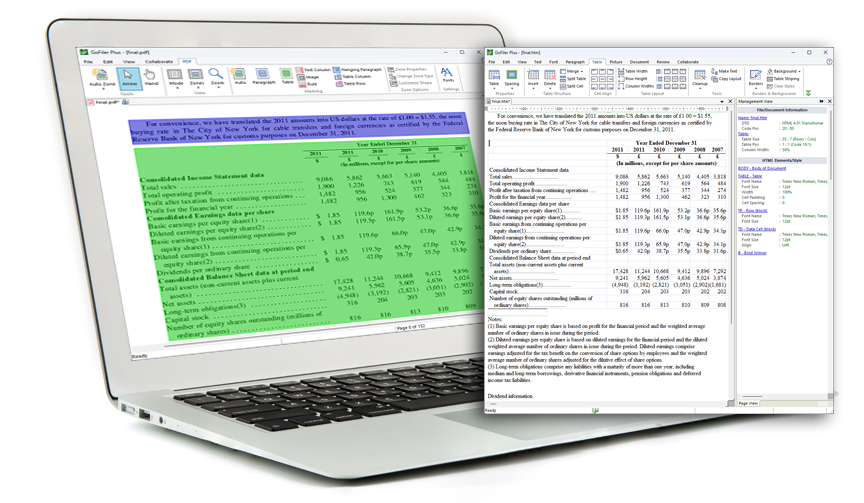

GoFiler can open PDF documents for viewing using an Adobe Reader plug-in or for conversion to HTML using our PDF View edit window. Once opened in PDF View, documents can be quickly prepared for conversion using our easy markup tools.

Zoning and Export
The software can automatically identify and mark images, text, tables, rules, and other elements in your PDF using zone tools. Users can also manually adjust zones prior to exporting documents with a variety of options to control images, pages, and hidden text.

Font Management Tools
Fonts and substitutions can be managed directly in GoFiler with a font management system that enables users to explore the fonts within a PDF document and create substitutions upon export to HTML.
The PDF View Module is just one of dozens of modules available in GoFiler. Start building your custom compliance software today!
| 13F | 13H | 144 | 17-H |
| 24F-2 | ABS Exhibit Editor | ATS-N | C |
| D | Data View | EDGAR Standard Forms | Fee Exhibit Editor |
| MA | N-CEN | N-CR | N-MFP |
| N-PORT | N-PX | PDF View | Regulation A |
| SBS Entity Forms | SCHEDULE 13D/G | SDR | Section 16 Ownership Forms |
| TA | X-17A | XBRL GRIP Reporting | XBRL SEC Reporting |
Step One: Choose your base software.
GoFiler has two options to start building your custom software. The formats you need to file will determine which option to choose. GoFiler+ contains support for HTML editing as well as collaboration tools.
| GoFiler | GoFiler+ | |
|---|---|---|
| Text View | ✓ | ✓ |
|
Open and edit documents in plain text.
|
||
| Code View | ✓ | ✓ |
|
Open and edit the base code for HTML or XML documents. |
||
| Page View | ✓ | |
|
Edit HTML as rendered documents with tools to view the file as it would appear in a browser as well as view the underlying HTML code.
|
||
| Image View | ✓ | |
|
Create or edit images and save them to EDGAR acceptable formats.
|
||
| Collaboration | ✓ | |
|
Set up collaboration tools to have keep your team on track.
|
||
Step Two: Select your modules.
Each module for EDGAR filing contains the tools necessary to create, import data into, edit, validate, review, and file the specified submission types. Other modules contain the tools for creating and editing documents within the specified formats. The following modules may be purchased to build your custom compliance software package. Modules can be added to your subscription at any time.
| EDGAR Submission Modules | |||
|---|---|---|---|
| 13F | 144 | 17-H | 24F-2 |
| ATS-N | C | D | EDGAR Standard Forms |
| MA | N-CEN | N-CR | N-MFP |
| N-PORT | N-PX | Regulation A | SBS Entity Forms |
| SCHEDULE 13D/13G | SDR | Section 16 Ownership Forms | TA |
| X-17A | |||
| EDGAR Exhibit Modules | |||
|---|---|---|---|
| ABS Exhibit Editor | Fee Exhibit Editor | ||
| XBRL Reporting Modules* | |||
|---|---|---|---|
| XBRL SEC Reporting | XBRL GRIP Reporting | ||
| Document Editing Modules | |||
|---|---|---|---|
| Data View | PDF View | ||
* XBRL Reporting Modules require GoFiler+ as the base software.